How to Create a Simple CLI Tool in Go: A Practical Step-by-Step Guide
Command-line tools remain one of the fastest ways to automate repetitive work, glue systems together, and ship internal developer utilities. A well-designed CLI can be easier to script than a GUI, simpler to deploy than a web service, and more ergonomic for power users who live in terminals all day. Go is a particularly strong fit for this kind of software: it compiles to a single static binary, has a fast startup time, provides a capable standard library, and makes concurrency, testing, and cross-compilation straightforward. For many teams, that combination is ideal for building small utilities that need to be reliable, portable, and easy to distribute.
In this guide, you will build a simple CLI tool in Go from the ground up. The focus is practical: start with the standard library, keep the first version simple, and only introduce third-party frameworks when the project truly needs them. Along the way, you will learn how to structure the project, parse flags, validate input, handle errors well, test command behavior, and package binaries for distribution. The goal is not just to make something that works, but to establish a pattern you can reuse for real tools that grow over time.

1) What a CLI Tool Is and Why Go Fits So Well
A command-line interface, or CLI, is a program you run from a terminal by passing commands, options, and arguments. Typical examples include utilities like git, kubectl, docker, and terraform. These tools are powerful because they compose naturally with shell pipelines, work well in automation, and can be integrated into CI/CD jobs, cron tasks, and developer scripts. A good CLI should be predictable, fast, and easy to discover through help text and sensible defaults.
Go maps especially well to this problem space. First, Go produces a single executable with minimal runtime dependencies, which makes distribution much easier than shipping a script with a long dependency chain. Second, startup time is usually very quick, which matters for tools invoked frequently or in automation loops. Third, the standard library includes everything needed for many small utilities: argument parsing, formatted output, file I/O, JSON, HTTP, logging, and testing. Fourth, Go has a strong cross-compilation story, so you can build Linux, macOS, and Windows binaries from one workstation without complicated toolchains.
Go also encourages a simple, maintainable code style. That matters for CLI tools because they tend to grow in an organic way: one flag becomes three, one command becomes a family of subcommands, and a “quick script” becomes a small product used by multiple teams. Go’s package model and testing support make it easier to keep that growth manageable. In practice, this means you can start with a tiny program and still have a clean path to a more feature-rich tool later.
2) Project Setup: Install Go, Create a Module, and Initialize the Folder Structure
Before writing code, set up the project in a way that will scale beyond the first prototype. Start by installing Go from the official distribution for your platform, then verify the installation with go version. For modern Go development, modules are the default dependency and build system, so initialize your project with go mod init.
A clean folder structure helps keep responsibilities separated even in a small tool. A common starting layout looks like this:
mycli/
├── cmd/
│   └── mycli/
│       └── main.go
├── internal/
│   └── app/
│       └── app.go
├── pkg/
├── go.mod
└── README.md
In this layout, cmd/mycli/main.go contains the entrypoint, internal/app holds application logic that should not be imported externally, and pkg is reserved for reusable packages only if you actually need them. Many small CLI tools never need pkg at all. Keeping the main package thin is a very good habit: it should wire dependencies together, parse configuration, and delegate behavior to other packages rather than implementing all logic inline.
A typical setup sequence might look like this:
mkdir mycli
cd mycli
go mod init example.com/mycli
mkdir -p cmd/mycli internal/app
touch cmd/mycli/main.go internal/app/app.go
At this stage, the main.go file can be extremely small:
package main

import "example.com/mycli/internal/app"

func main() {
	app.Run()
}
That may seem like overkill for a hello-world program, but it pays off quickly. Once the entrypoint is separated from the business logic, testing becomes much easier and command behavior becomes simpler to extend. Good structure early on prevents awkward refactors later when the CLI starts accumulating features.
3) Use the Standard Library First: Flag Parsing, Usage Text, and Exit Codes
For many CLI tools, the Go standard library is enough. The flag package provides basic flag parsing, the fmt package handles output, and os gives you access to arguments and exit codes. Starting with the standard library keeps dependencies minimal and helps you understand the actual mechanics of the CLI before introducing abstractions.
Here is a minimal example:
package main

import (
	"flag"
	"fmt"
	"os"
)

func main() {
	name := flag.String("name", "", "Name to greet")
	flag.Usage = func() {
		fmt.Fprintf(flag.CommandLine.Output(), "Usage of %s:\n", os.Args[0])
		flag.PrintDefaults()
	}
	flag.Parse()

	if *name == "" {
		flag.Usage()
		os.Exit(2)
	}

	fmt.Printf("Hello, %s!\n", *name)
}
This tiny program introduces several important CLI concepts. The flag package parses named options. The Usage function controls the help text that appears when users ask for guidance or make a mistake. And os.Exit(2) communicates that the command failed due to incorrect usage rather than an internal runtime failure. Exit codes matter in automation: scripts and CI systems often rely on them to determine whether a command succeeded.
The standard library also encourages discipline around output channels. By convention, normal output should go to standard output, while errors and diagnostics should go to standard error. That distinction is important because it allows users to redirect or pipe data cleanly. When building your CLI, think carefully about what is machine-readable output versus what is human-facing messaging.
Another practical habit is to keep your usage text concise but explicit. If a flag is required, say so. If a default exists, document it. If an option changes behavior in a surprising way, explain it early. Small improvements in help text dramatically reduce support friction later.

4) Build the First Command: Reading Arguments, Validating Input, and Printing Output
Once the basic flag plumbing is in place, build a real command that accepts arguments and performs useful work. A simple and common example is a tool that greets a user or transforms input text. The purpose here is not the task itself; it is to practice the core flow of reading arguments, validating them, and returning output in a predictable way.
A straightforward implementation might look like this:
package main

import (
	"flag"
	"fmt"
	"os"
	"strings"
)

func main() {
	prefix := flag.String("prefix", "Hello", "Greeting prefix")
	flag.Parse()

	args := flag.Args()
	if len(args) != 1 {
		fmt.Fprintln(os.Stderr, "error: exactly one name argument is required")
		flag.Usage()
		os.Exit(2)
	}

	name := strings.TrimSpace(args[0])
	if name == "" {
		fmt.Fprintln(os.Stderr, "error: name cannot be empty")
		os.Exit(2)
	}

	fmt.Printf("%s, %s!\n", *prefix, name)
}
This example illustrates a few important habits. First, positional arguments are accessed through flag.Args(). Second, input should be validated before any output is emitted. Third, validation failures should produce actionable error messages. The phrase “exactly one name argument is required” is more useful than a generic “invalid input” because it tells the user what to fix.
You should also decide early whether your CLI is interactive or non-interactive. Non-interactive tools should prefer deterministic output and avoid prompts unless explicitly requested. That makes them easier to automate. For commands that accept text input, think about trimming whitespace, handling empty strings, and normalizing case if the domain requires it.
When printing output, be deliberate about formatting. If the output is intended for humans, readable prose is fine. If it is intended for other tools, consider using structured formats like JSON or key-value lines. A CLI that can operate in both modes often becomes much more versatile. The key is to avoid mixing machine-readable data with incidental log messages on standard output.
5) Add Quality-of-Life Features: Help Text, Version Flags, and Error Handling
A useful CLI is more than a working command. It should be discoverable, debuggable, and friendly to both first-time users and automation. Three small improvements make a disproportionate difference: polished help text, a version flag, and consistent error handling.
Help text is the first line of defense against confusion. In Go, you can customize flag.Usage to present a clearer explanation of what the tool does, what flags it supports, and how to use it. Include examples if the command is not obvious. A good usage block should answer the most likely questions without forcing users to read source code or documentation.
A version flag is also valuable. It helps users and support engineers identify exactly what build is running, which matters when bugs appear in the wild. A simple implementation can use package-level variables populated at build time:
package main

import (
	"flag"
	"fmt"
	"os"
)

var version = "dev"

func main() {
	showVersion := flag.Bool("version", false, "Print version and exit")
	flag.Usage = func() {
		fmt.Fprintf(flag.CommandLine.Output(), "mycli - a simple example CLI\n")
		fmt.Fprintf(flag.CommandLine.Output(), "Usage: %s [flags] <name>\n", os.Args[0])
		flag.PrintDefaults()
	}
	flag.Parse()

	if *showVersion {
		fmt.Println(version)
		return
	}

	// ... normal command logic ...
}
Error handling deserves special attention. Do not silently swallow errors, and do not dump raw internal errors to the user without context. A better pattern is to wrap errors with a short explanation and preserve the underlying cause for debugging. For example, if a file cannot be opened, say which file failed and why. If network access fails, say what operation was attempted and whether the failure is likely transient.
Another quality-of-life improvement is consistent exit behavior. Many CLIs use exit code 0 for success, 1 for general errors, and 2 for usage mistakes. Staying consistent makes scripting easier. If your tool eventually has multiple commands or modes, define a small set of exit conventions and stick to them.
Finally, avoid overengineering too early. It is easy to add logging frameworks, configuration systems, and fancy abstractions before the tool has earned them. The best CLI improvements usually come from user experience: clearer messages, predictable behavior, and sensible defaults.
6) Organize Code for Growth: Commands, Internal Packages, and Separation of Concerns
As a CLI grows, the biggest risk is not feature complexity but structural clutter. If all logic stays in main.go, the program becomes difficult to test and painful to extend. Good Go CLI design uses separation of concerns: the command layer handles parsing and orchestration, while packages under internal/ implement business logic.
A practical pattern is to create one package per command or feature area. For example:
mycli/
├── cmd/
│   └── mycli/
│       └── main.go
├── internal/
│   ├── app/
│   │   └── app.go
│   ├── greet/
│   │   └── greet.go
│   └── config/
│       └── config.go
Here, internal/greet could contain the business rules for the greeting behavior, while internal/app coordinates flag parsing and command execution. That way, you can test logic without needing to execute the full binary. This is especially useful when the CLI begins interacting with files, APIs, databases, or complex state.
A good rule of thumb is that main should be small and boring. It should construct dependencies, parse flags, call application code, and convert errors into exit codes. The rest of the code should live in packages with clear responsibility. That makes it easier to test components in isolation and to replace implementation details later.
Interfaces can help, but only when they solve a concrete problem. For example, if your CLI writes to disk or calls external services, define narrow interfaces around those operations so you can mock them in tests. However, avoid abstracting everything prematurely. In Go, simple concrete types are often better than layers of interfaces that add ceremony without much benefit.
If you anticipate multiple commands, it can help to define a command dispatcher early. Even if you only have one command today, organizing the code around command handlers makes it easier to add init, status, sync, or other verbs later.
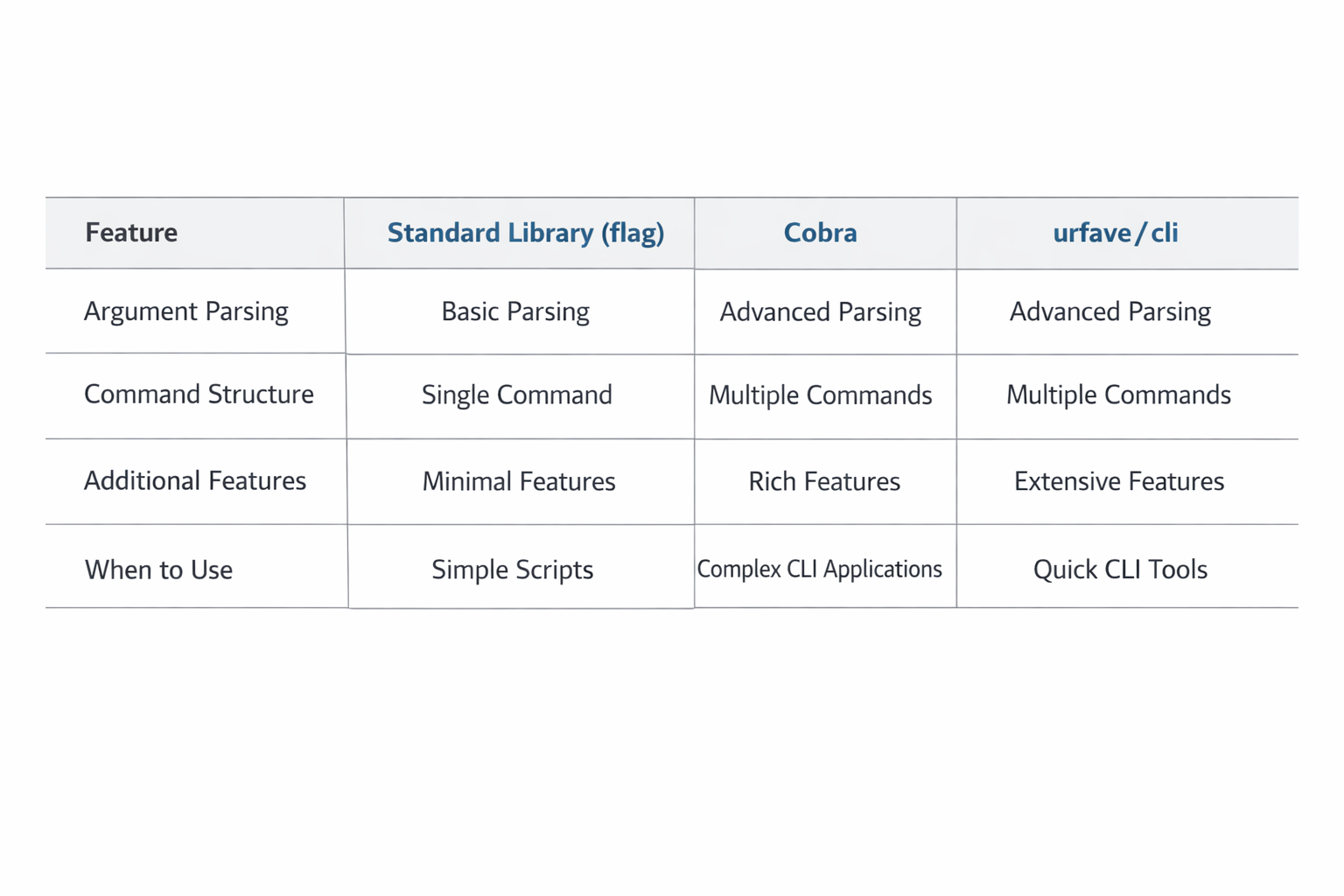
7) Optional Enhancements: Subcommands with Cobra or urfave/cli When the App Grows
Sometimes the standard library is enough forever. Other times, the CLI grows into a multi-command tool with richer flag handling, nested commands, shell completions, and shared configuration. At that point, a framework such as Cobra or urfave/cli can save time.
Cobra is widely used for command trees and is a common choice for tools that need subcommands, persistent flags, and autogenerated help. urfave/cli is also popular and tends to feel lightweight and ergonomic for many applications. The right choice depends on your preferences and on the shape of the CLI you are building. If the app is small, do not adopt a framework just because it is popular. The standard library is often simpler, easier to reason about, and easier to maintain.
Frameworks become useful when you need features like:
multiple subcommands with shared global flags
autogenerated help and usage output
shell completion scripts
structured command lifecycle hooks
large command trees with nested behavior
consistent parsing patterns across many entrypoints
A migration path can be gradual. You might begin with a single command in the standard library, then introduce a framework only after the interface becomes more complex. This approach helps prevent premature abstraction. It also keeps your first version easy to understand for contributors who just need to trace the command path.
If you do adopt a framework, keep the same architectural principle: isolate business logic from command wiring. The framework should be responsible for parsing and dispatching, not for containing all of your domain logic. That separation keeps your CLI testable and prevents vendor lock-in from leaking into the rest of the codebase.
8) Test and Debug the CLI: Unit Tests, Table-Driven Tests, and Command Testing
A CLI that is easy to run should also be easy to test. Go’s testing package makes this straightforward, especially when the code is organized into small, focused functions. The most useful tests are usually unit tests for business logic and table-driven tests for input validation and edge cases.
Table-driven tests are a Go staple because they make it easy to express many cases compactly. For example, if you have a function that validates names, you can test a wide range of inputs in one file:
func TestValidateName(t *testing.T) {
	tests := []struct {
		name    string
		input   string
		wantErr bool
	}{
		{"valid name", "Alice", false},
		{"empty string", "", true},
		{"whitespace only", "   ", true},
	}

	for _, tt := range tests {
		t.Run(tt.name, func(t *testing.T) {
			err := ValidateName(tt.input)
			if (err != nil) != tt.wantErr {
				t.Fatalf("ValidateName(%q) error = %v, wantErr %v", tt.input, err, tt.wantErr)
			}
		})
	}
}
For command-level testing, you can test the functions that perform the work rather than invoking the entire binary every time. This keeps tests fast and stable. If needed, you can also run the compiled command in an integration-style test and capture its standard output and error streams. That is useful for verifying exact user-facing behavior, exit codes, and flag handling.
Debugging CLI apps is often easiest when the code is structured around explicit inputs and outputs. Favor functions that accept dependencies as parameters, such as writers, readers, or config values. That allows tests to use bytes.Buffer or temporary files instead of touching real terminals or production paths.
When debugging, pay attention to standard error versus standard output. A surprising number of CLI bugs come from accidentally writing diagnostics to the wrong stream or mixing human logs with structured data. Also remember that many command issues are caused by path differences, shell quoting, or environment variables, so test with realistic invocations rather than only calling functions directly.
For more advanced CLI testing, you can create integration tests that run the built executable with exec.Command. These tests are slower, but they are valuable for checking the final user experience. Use them selectively for behaviors that matter at the interface boundary.
9) Package and Distribute: Build Binaries, Cross-Compile, and Release for Multiple Platforms
One of Go’s biggest advantages for CLI development is easy distribution. Instead of shipping source code or a platform-specific runtime, you can build a standalone binary for the target platform. This makes release workflows simpler and reduces friction for users.
For a local build, the common command is:
go build -o bin/mycli ./cmd/mycliThat produces a binary in bin/, which is a sensible place to keep build artifacts out of your source tree. For release builds, you will often want to cross-compile. Go makes this easy with GOOS and GOARCH environment variables:
GOOS=linux GOARCH=amd64 go build -o dist/mycli-linux-amd64 ./cmd/mycli
GOOS=darwin GOARCH=arm64 go build -o dist/mycli-darwin-arm64 ./cmd/mycli
GOOS=windows GOARCH=amd64 go build -o dist/mycli-windows-amd64.exe ./cmd/mycli
If your CLI is pure Go and does not depend on platform-specific C libraries, cross-compilation is usually straightforward. If you need reproducible release artifacts, consider setting -trimpath and -ldflags during the build. The common use case is embedding version information:
go build -ldflags="-s -w -X main.version=1.2.3" -o dist/mycli ./cmd/mycliA good release process also includes checksums, changelogs, and clear naming conventions for binaries. Users should be able to tell which platform and architecture a file is intended for. If your CLI is likely to be installed via package managers or release pages, maintain consistent versioning and document how to verify downloads.
For internal tools, distribution might simply mean checking the binary into an artifact store or publishing it in CI. For public tools, you may eventually want automated release pipelines. Even then, the core principle remains the same: make the binary easy to obtain, easy to identify, and easy to run.
10) Conclusion: Recommended Next Steps, Maintenance Tips, and Common Pitfalls to Avoid
Building a CLI in Go is less about memorizing a framework and more about learning a durable set of habits. Start with the standard library, keep the entrypoint thin, validate input early, and design help text as if users will rely on it without reading the source. If you do that, you will end up with a tool that is simple to maintain and pleasant to use.
The best next step is usually to extend your toy tool into something real. Add a file operation, an API call, a report generator, or a small automation task that solves a genuine problem. That is where you will discover which abstractions matter and which ones do not. As the CLI grows, keep responsibilities separated, move logic out of main, and write tests for the parts of the code most likely to change. That discipline will save time every time the tool evolves.
A few common pitfalls are worth avoiding. Do not overcomplicate the first version with a large framework unless subcommands and advanced parsing are already necessary. Do not mix human logs with machine-readable output. Do not ignore exit codes. Do not let main.go become a dumping ground for business logic. And do not postpone tests until the interface becomes too painful to verify by hand. Each of those mistakes is easy to make and expensive to fix later.
Go is an excellent language for CLIs because it makes the common path simple: small binaries, fast execution, clean testing, and easy distribution. If you follow the patterns in this guide, you will have a strong foundation for building tools that stay useful long after the prototype stage.