
Hello World in Rust with Axum: A Modern Fast-Start Guide
Rust is increasingly popular for backend services because it combines low-level performance, strong memory safety, and modern tooling with a growing web ecosystem. If you are building your first “Hello World” web app in Rust, you are not just learning how to print text in a browser—you are learning how Rust approaches concurrency, async I/O, type safety, and request handling in a production-oriented way. That makes the first small server a useful entry point into the broader Rust web stack.
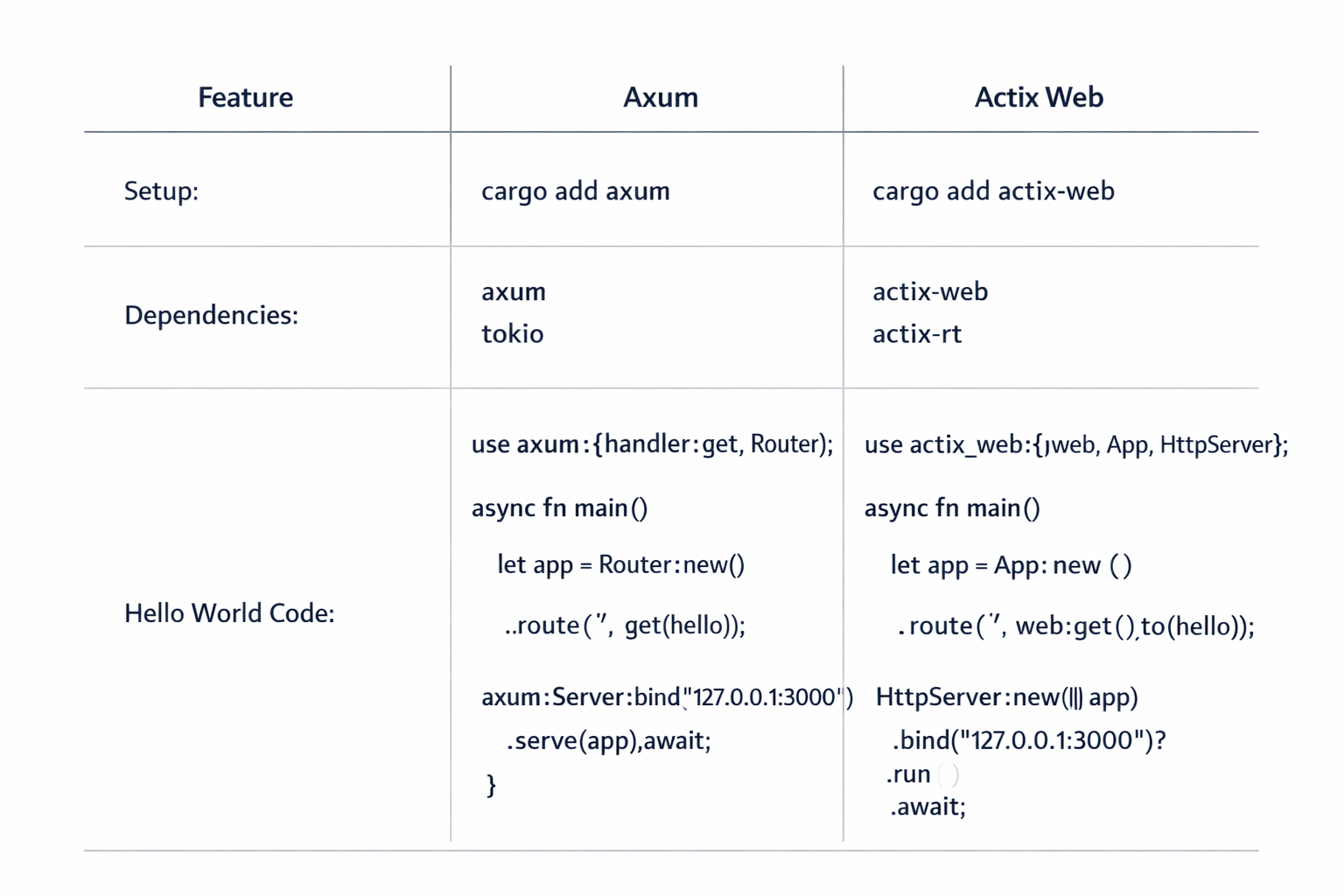
Two frameworks tend to come up early: Axum and Actix Web. Both are fast, both are widely used, and both can power serious applications. But they differ in style. Axum leans into the modern Rust async ecosystem and emphasizes composable extractors, Tower middleware, and a clean mental model. Actix Web is mature, highly optimized, and known for its strong ergonomics and battle-tested ecosystem. For a beginner, the “best” choice often depends less on raw speed and more on how you want to learn Rust web development.
In this guide, you will build a minimal Hello World server, understand the project structure, learn the key concepts behind routing and async handlers, and compare Axum and Actix Web side by side. By the end, you should be able to create a basic Rust web service confidently and know what to learn next.
1. Why Rust web frameworks matter for a first Hello World app
A Hello World app is intentionally small, but in Rust it still teaches foundational ideas that matter in real services. Unlike scripting languages where a web server can be a handful of lines with minimal structure, Rust encourages you to think in terms of types, ownership, async execution, and explicit data flow. That can feel heavier at first, but it pays off quickly when your application grows.
Rust web frameworks matter because they define the shape of that learning experience. A framework such as Axum or Actix Web determines how you define routes, extract request data, return responses, attach middleware, and handle shared state. When you are starting out, the framework is not just a tool—it is a teaching model. The framework’s API influences how you understand async functions, error handling, serialization, and server setup.
For a first app, the right framework should make it easy to get something running while still reflecting how Rust applications are built in practice. A good Hello World example should show:
how to create a Cargo project,
how to add dependencies,
how to define a route,
how to return a response,
and how to run a local HTTP server.
This is where Rust stands out. Even the simplest server gives you a credible foundation for building APIs, microservices, internal tools, or edge services. If you plan to use Rust beyond tutorials, your Hello World app should be treated as a small but meaningful introduction to the ecosystem, not just a throwaway demo.
2. Axum vs Actix Web: which framework fits your learning and project goals
Choosing between Axum and Actix Web is one of the first decisions you will make in Rust web development. The answer depends on whether your priority is learning modern async patterns, maximizing framework maturity, or aligning with a particular ecosystem.
Axum is built around Tower and Tokio, two central pieces of the modern Rust async stack. Its design is highly composable: handlers are usually plain async functions, request data is pulled in through extractors, and middleware fits naturally into the Tower ecosystem. For many developers, Axum feels idiomatic if they are already using Tokio and want a straightforward path to building APIs. It tends to be especially appealing if you prefer a clean, modular architecture and want to learn the async ecosystem that powers many contemporary Rust services.
Actix Web is one of the best-known and most established Rust web frameworks. It is widely regarded for strong performance, polished ergonomics, and a mature feature set. It has a slightly different mental model from Axum, and some developers find its API especially productive for application development. Actix Web has a large footprint in the Rust community and a long track record in production use.
If your goal is to learn the modern async Rust style, Axum is often the easiest conceptual fit. If your goal is to work with a mature, feature-rich framework that has proven itself in many real-world deployments, Actix Web is an excellent choice. For a first Hello World app, both are valid, but Axum often feels a little more aligned with current ecosystem conventions around Tokio and Tower.
Practical decision rule
Choose Axum if you want modern composition, clean async handlers, and close alignment with Tokio/Tower.
Choose Actix Web if you want a mature framework with a very established reputation and a highly productive API.
If you are unsure, start with Axum for learning and revisit Actix Web once you are comfortable with Rust web fundamentals.
3. Prerequisites: installing Rust, Cargo, and verifying your local toolchain
Before writing any web code, you need a working Rust toolchain. The standard way to install Rust is through rustup, which manages the compiler, Cargo, and toolchain versions. Cargo is Rust’s build system and package manager, and it is central to almost every Rust workflow you will use.
After installation, verify that Rust is available by checking the compiler and package manager versions. A healthy setup should show rustc, cargo, and rustup available from your terminal. This matters because many beginner issues are not caused by the framework at all—they are caused by toolchain mismatch, missing components, or an outdated installation.
Typical checks include:
rustc --version
cargo --version
rustup --version
You should also ensure that your default toolchain is current enough for the version of the framework you want to use. Rust evolves quickly, and web frameworks usually track stable Rust fairly closely. If you encounter dependency errors later, one of the first things to confirm is that your local toolchain is up to date.
If you plan to use a code editor like VS Code, an editor extension such as rust-analyzer is extremely helpful. It provides inline diagnostics, autocomplete, go-to-definition, and quick fixes. In Rust, these quality-of-life tools are not optional in practice; they are part of what makes development smooth.
A solid prerequisite setup usually includes:
Rust installed via rustup,
Cargo available in your path,
a recent stable toolchain,
and a Rust-aware editor with language server support.
Once that is in place, you are ready to create a project and add dependencies without fighting your environment.
4. Creating a new Rust project and adding the Axum or Actix dependency
Cargo makes project setup simple. To create a new binary project, run:
cargo new hello_rust_web
cd hello_rust_web
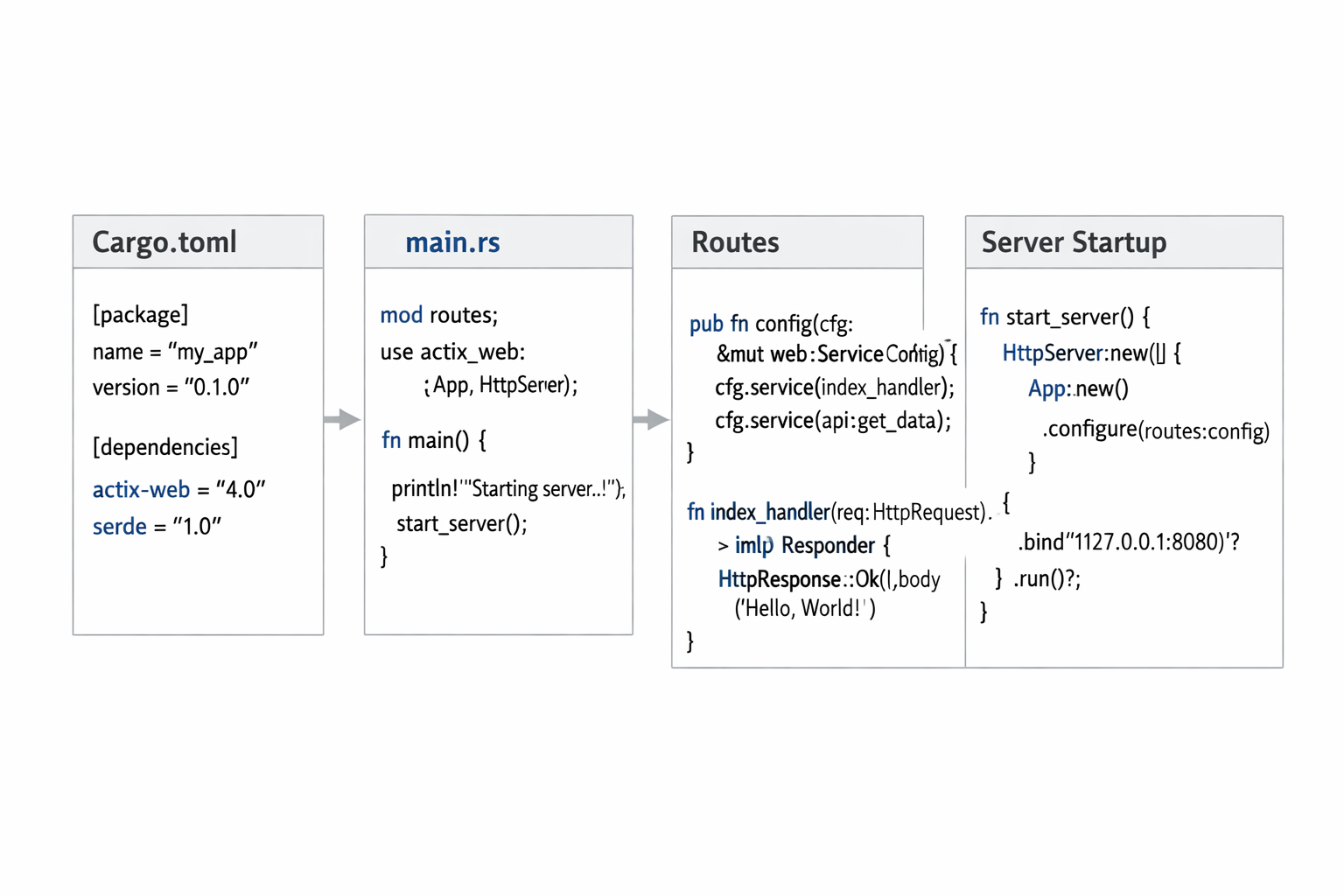
This creates a standard Rust application layout with a Cargo.toml manifest and a src/main.rs entry point. For a web server, that is enough to begin.
Adding Axum
If you want to use Axum, add it to Cargo.toml along with Tokio, which provides the async runtime:
[dependencies]
axum = "0.7"
tokio = { version = "1", features = ["full"] }
This gives you the core pieces needed for a basic HTTP server. In many real projects, you will also add logging, tracing, serialization, and middleware support later.
Adding Actix Web
If you want to use Actix Web instead, your dependencies look like this:
[dependencies]
actix-web = "4"
Actix Web includes the essentials needed for server development, and the setup is similarly compact.
The important thing for beginners is to keep the project small at first. Do not add database layers, authentication libraries, or complex middleware before the simplest request-response loop is working. The value of Hello World is that it proves your toolchain, dependency graph, and server runtime are all functioning correctly.
For a first pass, keep the scope narrow:
one project,
one route,
one response,
one local server.
That discipline makes debugging much easier and helps you understand each layer of the stack.
5. Building the simplest Hello World handler and route
The core of the app is a handler that returns a simple string. In Axum, the most common pattern is an async function that returns something convertible into a response.
Axum example
use axum::{
    response::Html,
    routing::get,
    Router,
};

async fn hello_world() -> Html<&'static str> {
    Html("<h1>Hello, World from Axum!</h1>")
}

#[tokio::main]
async fn main() {
    let app = Router::new().route("/", get(hello_world));

    let listener = tokio::net::TcpListener::bind("127.0.0.1:3000")
        .await
        .expect("failed to bind port");

    axum::serve(listener, app)
        .await
        .expect("server failed");
}
This is a minimal but complete server. It defines a route at /, connects it to the hello_world handler, binds to a local port, and starts serving requests.
Actix Web example
If you prefer Actix Web, the equivalent minimal server looks like this:
use actix_web::{get, App, HttpServer, Responder};

#[get("/")]
async fn hello_world() -> impl Responder {
    "Hello, World from Actix Web!"
}

#[actix_web::main]
async fn main() -> std::io::Result<()> {
    HttpServer::new(|| {
        App::new().service(hello_world)
    })
    .bind(("127.0.0.1", 3000))?
    .run()
    .await
}
Both examples do the same basic thing, but the syntax reflects each framework’s design philosophy. Axum uses router composition with explicit route registration, while Actix Web commonly uses attribute-based handlers and service registration.
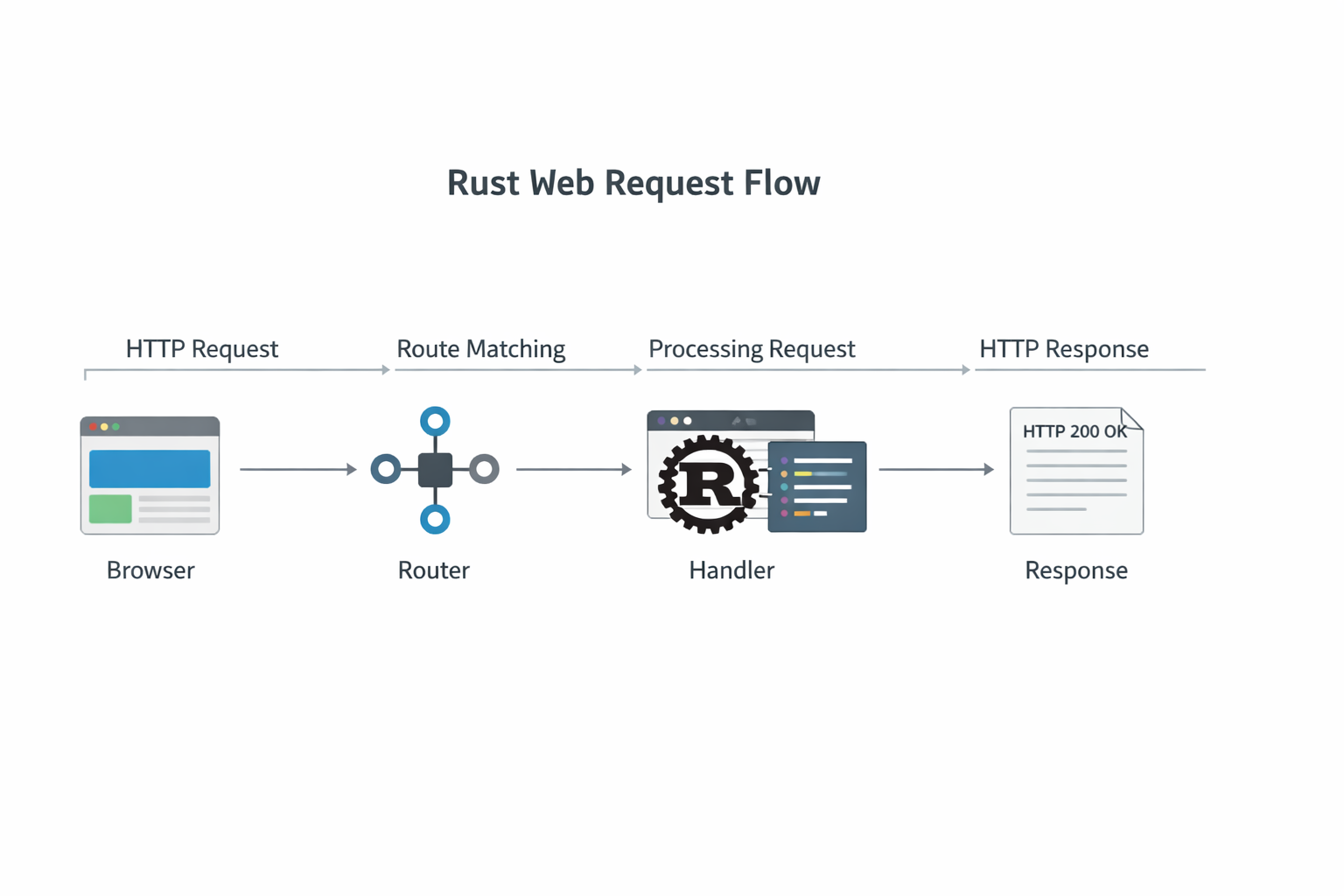
The simplest lesson here is that a web handler is just a function that receives a request context and returns a response. The framework handles the network plumbing so you can focus on the handler logic.
6. Running the server locally and testing the response in a browser or curl
Once your code compiles, start the server with Cargo:
cargo runCargo will compile the project and execute the resulting binary. If everything is set up correctly, the server should bind to 127.0.0.1:3000.
Testing in a browser
Open your browser and visit:
http://127.0.0.1:3000/You should see the Hello World message rendered in the browser. If you returned plain text, the browser will display it directly. If you returned HTML, it will render the markup.
Testing with curl
A browser is convenient, but curl is often better for confirming raw HTTP behavior:
curl http://127.0.0.1:3000/This is especially useful when you are working on APIs, because it shows you the exact response body without browser rendering. If the response is plain text, you should see the message immediately. If something goes wrong, curl can help you verify whether the server is reachable, whether the route exists, and whether the response type is correct.
What to check if it fails
If the server does not start, inspect the terminal for compile errors or port-binding issues. If the server starts but you get a connection error, make sure the port in your browser or curl command matches the one used in your code. If the response is empty or not what you expected, confirm that the route path is correct and that the handler is registered with the router or app.
At this point, you have completed the full loop:
write code,
compile,
run,
test the output.
That loop is the basis of all web development, whether your app is 20 lines or 20,000.
7. Understanding the core concepts: async handlers, routing, and response types
The Hello World app becomes much more useful when you understand the concepts behind it. In Rust web frameworks, three ideas matter immediately: async handlers, routing, and response types.
Async handlers
Modern Rust web servers rely on asynchronous execution because they handle network I/O efficiently. An async handler allows the runtime to pause work while waiting on network, file, or database operations. Even if your first Hello World handler does not perform any actual async work, it is usually declared async because the framework expects that shape and because it prepares you for real service logic.
Routing
Routing maps incoming request paths and methods to handler functions. A route like GET / means the server should call a specific function when a client sends a GET request to the root path. In Axum, routes are usually composed through a router object. In Actix Web, routes are often registered through services and attributes. The idea is the same: the framework matches HTTP requests to code.
Response types
Handlers return response types, not just raw strings. A response includes a status code, headers, and a body. Frameworks usually let you return common Rust values like strings, JSON-serializable data, or custom response objects. That makes it easy to start with simple values and evolve into richer HTTP behavior later.
The key mental model is this: a web framework is an adapter between the outside world’s HTTP protocol and your Rust functions. Your job is to define the logic; the framework handles request parsing, response encoding, and connection management.
8. A side-by-side comparison of Axum and Actix Web ergonomics, ecosystem, and performance
If you are choosing a framework for more than a tutorial, you should compare more than just Hello World syntax. Ergonomics, ecosystem integration, and runtime behavior all matter.
Ergonomics
Axum is often praised for clarity. It encourages small, composable pieces and works naturally with extractors for pulling data out of requests. That can make code easier to reason about when your application grows. Actix Web, meanwhile, has a very polished developer experience and can feel more direct for common tasks. Many developers find its attribute macros and service registration style extremely efficient.
Ecosystem
Axum is tightly connected to the broader Tower ecosystem, which is useful if you want a modular async stack. Actix Web has its own mature ecosystem and a long history of use in production applications. In both cases, you can build serious systems, but the surrounding abstractions differ.
Performance
Both frameworks are fast enough for the vast majority of production workloads. For a first project, performance differences are not the deciding factor. In real applications, architecture, I/O patterns, database access, caching, and middleware often matter more than small benchmark differences. If you are building a Hello World app, choose the framework that helps you learn and ship clean code, not the one with the most impressive microbenchmark headline.
9. Common beginner mistakes and how to debug compile or runtime errors
Rust’s compiler is famously helpful, but beginners still run into predictable issues. The good news is that most early errors are easy to diagnose once you know what to look for.
Mistake 1: forgetting async runtime setup
If you are using Axum and your main function is not marked correctly for async execution, the server will not start. Axum commonly relies on Tokio, so your entry point needs the right runtime macro and dependencies. In practice, that means checking tokio features and making sure main is asynchronous.
Mistake 2: route not registered correctly
A handler can compile perfectly and still not respond if it is not attached to the correct route. Double-check the path string, the HTTP method, and whether the router or service is actually being used by the server.
Mistake 3: mismatched return types
Rust’s type system is strict, which is a strength but can be surprising at first. If a handler returns an HTML wrapper, a string slice, or an implementation of a response trait, make sure the framework expects that exact pattern. The compiler error message often points directly to the mismatch.
Mistake 4: port already in use
If the server fails at runtime, another process may already be using the port. Try a different port or stop the conflicting process. This is a common issue when repeatedly restarting local development servers.
Mistake 5: version mismatch
Sometimes the project compiles in one tutorial but not another because the framework version changed. Rust’s ecosystem evolves quickly, and example code on the internet can become outdated. If a snippet fails, confirm that your dependency versions match the API style you are using.
Debugging strategy
Use this sequence:
read the first compiler error carefully,
fix the earliest cause, not the later symptoms,
re-run
cargo buildorcargo run,test the server with
curl,reduce the code to the simplest version if needed.
Rust debugging gets easier with experience because compiler errors become more informative over time. Most beginner frustration comes from trying to solve too many problems at once. Keep the app tiny until the behavior is stable.
10. Next steps: adding JSON, middleware, logging, and deployment
Once Hello World works, the natural next step is to evolve the server into something closer to a real service. The path forward is straightforward, and both Axum and Actix Web support the features you will need.
JSON APIs
Instead of returning a string, you can return structured JSON for API endpoints. This is where Rust’s serialization ecosystem becomes valuable. You define data structures, derive serialization traits, and let the framework convert Rust values into HTTP responses.
Middleware
Middleware is useful for cross-cutting concerns such as request logging, CORS, compression, authentication, and timing. Axum integrates well with Tower middleware, while Actix Web provides its own middleware options and ecosystem support. In practice, middleware is how you keep your route handlers focused on business logic.
Logging and tracing
Once you move beyond Hello World, good observability becomes important. Add structured logging early so you can inspect request flow, failures, and timing behavior. In Rust, logging and tracing are often part of the standard web application toolchain rather than an afterthought.
Deployment
For deployment, you will likely containerize the application or compile a release binary for your target environment. Rust is well suited to small, fast deployable artifacts, which makes it a strong candidate for cloud services and container-based deployment models. Before deploying, use release builds, configure environment variables, and ensure that your server binds correctly in production.
Common expansion roadmap
A practical progression looks like this:
Hello World route,
JSON response endpoint,
request logging,
middleware for headers or CORS,
shared application state,
database integration,
deployment pipeline.
The key is to build in layers. Do not jump from a single route to a complex production system in one step. Add one capability, verify it, and then move on.
Conclusion
A Rust Hello World app is small, but it introduces a surprisingly large set of important concepts: Cargo-based project management, async handlers, routing, response types, and the philosophy of modern Rust web development. Axum and Actix Web both make excellent starting points, but they serve slightly different learning styles and project goals.
If you want a clean introduction to the modern async ecosystem, Axum is a strong choice. If you want a mature, highly productive framework with a long production track record, Actix Web is equally compelling. In both cases, the fastest way to learn is to start small, verify the server locally, and grow the app one feature at a time.
The main lesson is that Hello World is not trivial in Rust—it is foundational. It teaches you how Rust applications are assembled, how HTTP handling maps to strongly typed code, and how to move from a simple route to a real service architecture with confidence.