
How to Set Up Nginx as a Reverse Proxy for Modern Applications
Nginx remains one of the most practical and battle-tested choices for reverse proxying modern applications. It sits at the intersection of performance, simplicity, and operational flexibility: capable of serving static assets, terminating TLS, routing traffic to multiple backends, and handling high concurrency with a relatively small resource footprint. That combination is especially valuable in environments where application delivery has become more distributed, more containerized, and more dependent on API gateways, microservices, and real-time protocols.
In modern stacks, the reverse proxy is not just a traffic director. It is the first layer of control in front of application servers, shaping how requests are routed, secured, logged, balanced, retried, cached, and observed. Nginx is widely used in this role because it is stable under load, configurable without excessive complexity, and adaptable to both traditional VM-based deployments and cloud-native platforms like Docker and Kubernetes.
This post walks through the complete setup process, from first principles to production-ready configuration. You will learn how reverse proxies work, what to install and prepare, how to write a clean Nginx configuration, how to support HTTP/2, HTTP/3, WebSockets, and gRPC, and how to harden and tune your deployment for reliability. The goal is not just to make Nginx “work,” but to make it work well for modern applications that demand secure transport, low latency, and flexible routing.
1. Why Nginx Remains a Top Choice for Reverse Proxying Modern Applications
Nginx has remained relevant because the problems it solves have not gone away; they have become more important. Applications are now expected to serve multiple clients, route traffic to multiple services, support encrypted transport everywhere, and remain responsive under unpredictable demand. Nginx handles these requirements elegantly by acting as a thin, efficient control plane in front of application servers.
Its broad adoption is one of its biggest advantages. Nginx is used in startup stacks, enterprise environments, platform engineering teams, and cloud-native systems. That matters because operational maturity often follows ecosystem maturity. When a tool is widely deployed, you get better documentation, more examples, a larger talent pool, and more battle-tested patterns. Nginx also continues to see active release momentum in both the open-source and commercial lines, which is important for security patches, protocol support, and compatibility with current infrastructure patterns.
Another reason Nginx remains attractive is that it supports a wide range of deployment styles. A simple single-host reverse proxy for two Node.js apps can use the same conceptual building blocks as a more advanced edge layer fronting containers, gRPC services, or a multi-tenant platform. Teams do not need to switch tools just because the architecture evolves.
At a deeper level, Nginx works well because it separates concerns. Application servers focus on business logic. Nginx handles traffic management. That separation improves maintainability and can improve security and performance as well. You can terminate TLS once, centralize header normalization, enforce request limits, and apply routing rules without touching the application code.
2. Core Reverse Proxy Concepts: Routing, Upstreams, TLS, and Load Balancing
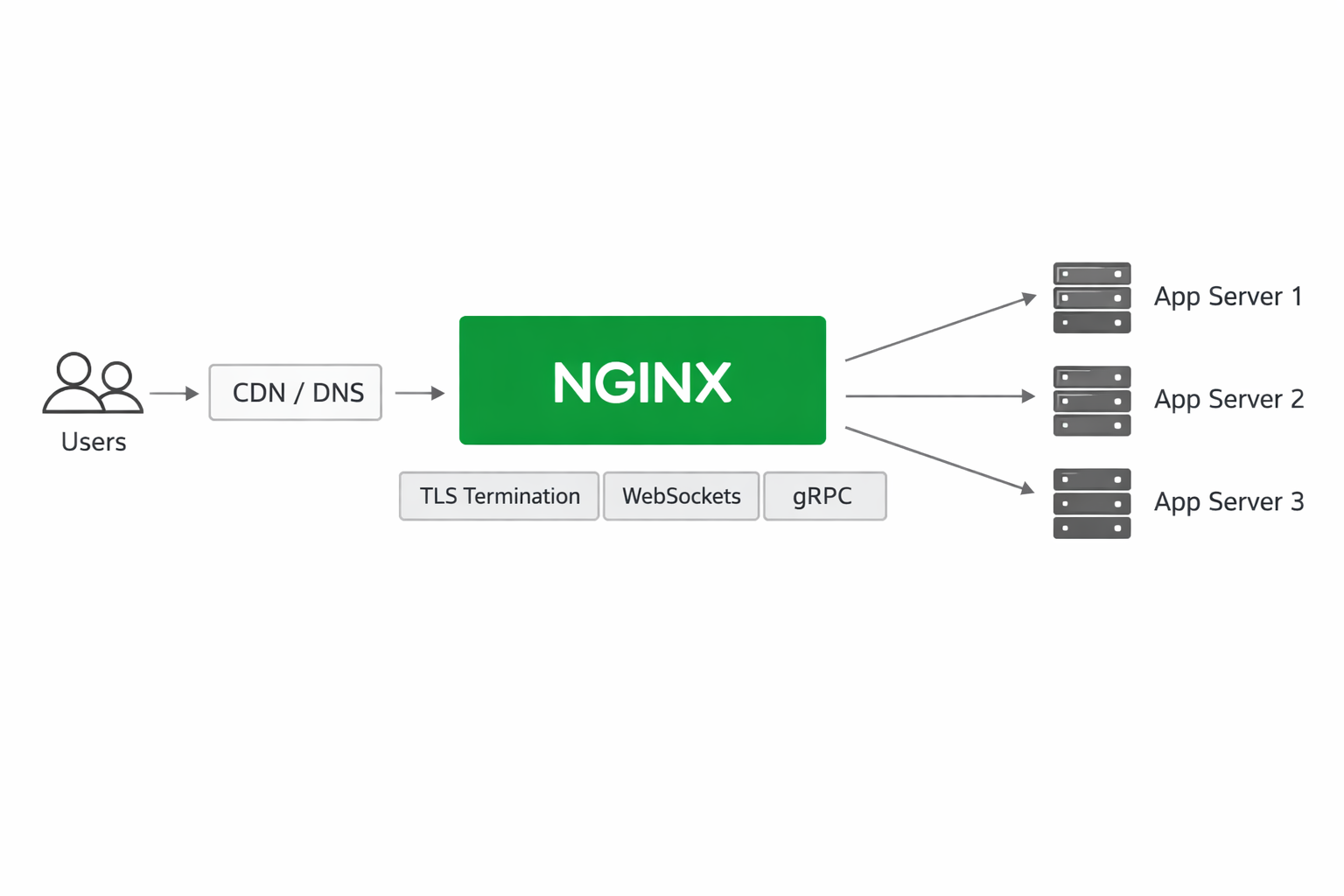
A reverse proxy sits between users and application servers. From the user’s perspective, they connect to a single public endpoint. From the application’s perspective, traffic may be distributed across multiple internal services. The reverse proxy receives the incoming request, applies routing logic, and forwards it to the appropriate upstream server.
Request routing is the foundation. A route can be based on hostname, path, headers, cookies, or even more advanced conditions. For example, api.example.com might forward to an API service, while app.example.com routes to a frontend server. Path-based routing can send /api/ to a backend service and / to a web app. This is how a single public domain can front multiple internal systems.
Upstreams are the backend destinations Nginx sends traffic to. An upstream may be a single application server or a pool of servers. If multiple upstreams are defined, Nginx can distribute traffic using a load-balancing strategy. The simplest method is round-robin, but Nginx also supports options like least connections and IP hash in appropriate contexts.
TLS termination is another core function. Rather than forcing each app server to manage public certificates, Nginx can accept HTTPS from clients, decrypt traffic at the edge, and forward plain HTTP or re-encrypted traffic to internal services. This centralizes certificate management and simplifies application deployment. In some environments, TLS is terminated at Nginx and then re-established to the backend as an internal security measure.
Load balancing helps when a service runs multiple instances. If one instance is busy or fails, Nginx can route requests elsewhere. That improves availability and can also smooth traffic spikes. In production systems, reverse proxies are not just traffic routers; they are part of the resilience strategy. They define how failures are isolated and how clients continue receiving service when individual backends degrade.
3. Prerequisites and Environment Setup
Before writing the configuration, prepare the environment carefully. A good reverse proxy setup depends on clean DNS, network access, and clear backend definitions.
First, install Nginx on the host or in a container image. On Linux, this is often done through the system package manager. For production, it is useful to verify whether you are deploying the open-source edition or Nginx Plus. The open-source version covers most reverse proxy use cases: routing, TLS termination, buffering, caching, WebSockets, and basic load balancing. Nginx Plus adds commercial features such as active health checks, live activity monitoring, and more advanced load-balancing capabilities. Choose based on operational needs rather than assumption.
Next, define your app backends. You need to know the internal hostnames, IP addresses, and ports of the services behind Nginx. This may be a local process on 127.0.0.1:3000, a VM at 10.0.1.20:8080, or a container service reachable through a private network. Document these destinations before building the config so your routing logic stays explicit.
DNS must point your public domain or subdomains at the IP address of the Nginx server or load balancer. If you are using multiple hostnames, make sure certificate names and server names align with the intended routes.
Firewall rules matter as well. Port 80 is usually used for HTTP and certificate issuance redirects, while port 443 handles HTTPS. If your backend services should be private, ensure only Nginx can reach them. Exposing internal application ports directly defeats the purpose of using a reverse proxy.
Finally, decide whether your deployment is single-host, multi-host, or containerized. The topology influences how you configure upstreams, service discovery, and health behavior. A clean environment setup now prevents brittle configuration later.
4. Step-by-Step Nginx Reverse Proxy Configuration
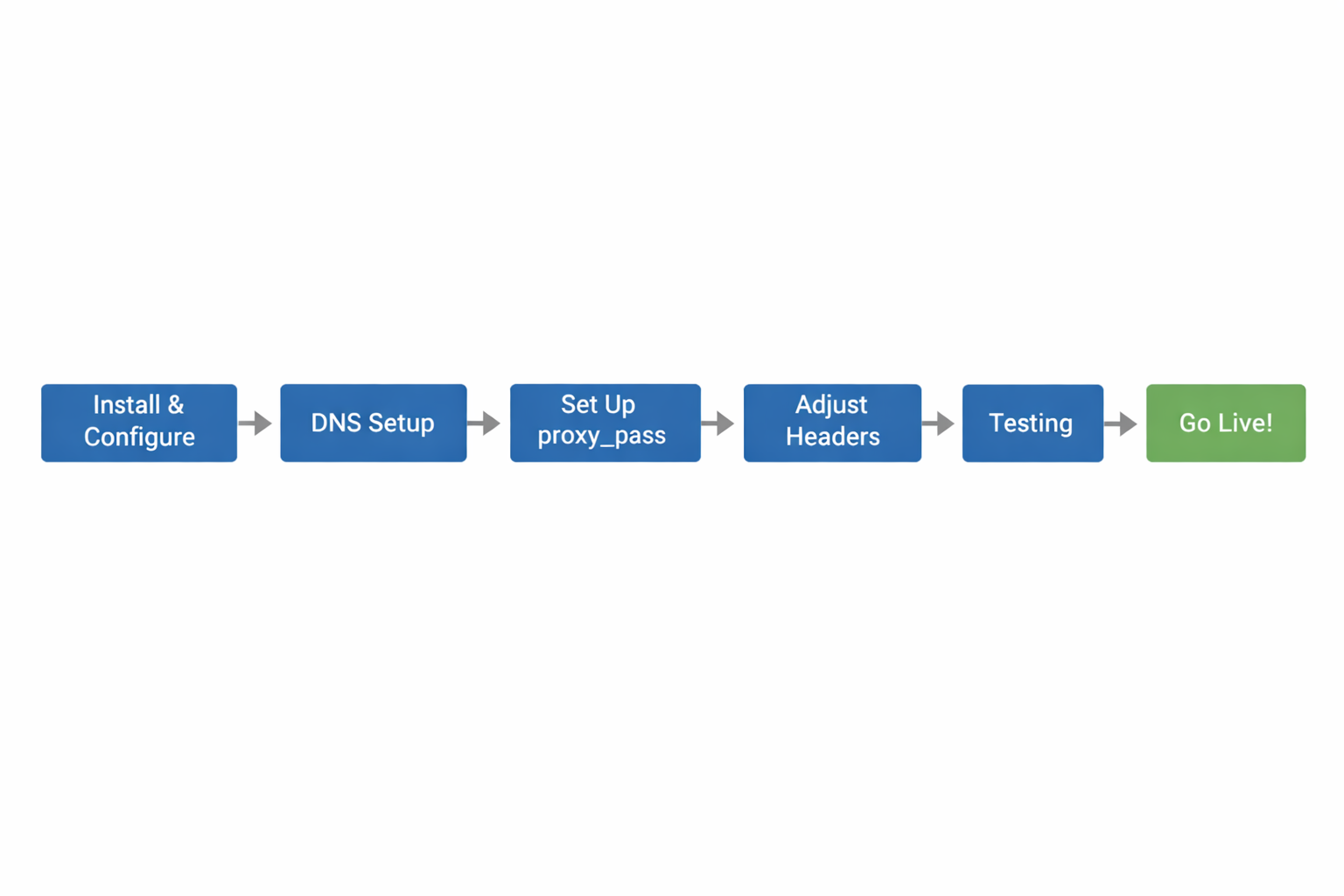
The most common Nginx reverse proxy pattern starts with a server block that listens for incoming requests, matches a domain name, and forwards traffic with proxy_pass. Start simple, then refine.
A minimal configuration might look like this:
upstream app_backend {
    server 127.0.0.1:3000;
}

server {
    listen 80;
    server_name example.com www.example.com;

    location / {
        proxy_pass http://app_backend;
        proxy_set_header Host $host;
        proxy_set_header X-Real-IP $remote_addr;
        proxy_set_header X-Forwarded-For $proxy_add_x_forwarded_for;
        proxy_set_header X-Forwarded-Proto $scheme;
    }
}
This configuration defines an upstream named app_backend and forwards all traffic under / to it. The proxy_set_header directives preserve important client and request metadata. Host keeps the original hostname visible to the application. X-Real-IP and X-Forwarded-For carry the client IP chain. X-Forwarded-Proto tells the backend whether the original request arrived over HTTP or HTTPS.
Preserving the host is important because many applications use it for redirects, absolute URLs, OAuth callbacks, tenant resolution, or virtual host logic. If you omit it, apps may generate incorrect links or break authentication flows.
Path handling is another common source of mistakes. proxy_pass behaves differently depending on whether it includes a URI suffix. If you want to forward /api/ to the backend while preserving the remainder of the path, you need to be careful with trailing slashes. For example, a location block like location /api/ { proxy_pass http://backend/; } rewrites the path differently from proxy_pass http://backend;. Test this behavior explicitly when designing routes.
For production, split HTTP and HTTPS. Redirect port 80 to 443, then terminate TLS in the secure server block. A clean structure usually looks like: one block for redirect, one block for encrypted traffic, one or more location blocks for route-specific handling, and upstream sections for backend pools.
5. Modern Protocol Support: HTTP/2, HTTP/3, WebSockets, and gRPC
Modern applications rely on more than plain request-response HTTP/1.1. Nginx can support a broad set of protocols, but each has operational details worth understanding.
HTTP/2 is useful for browser-facing applications because it reduces connection overhead and improves multiplexing over a single TLS session. In practice, enabling HTTP/2 on the TLS listener is often a straightforward performance win for asset-heavy frontends. It does not usually require application changes, but your certificates and TLS configuration must be correct.
HTTP/3 and QUIC are newer transport options built on UDP rather than TCP. They can improve performance and resilience in some network conditions, especially on lossy mobile networks. Support and configuration depend on the Nginx build and version, so treat HTTP/3 as an explicit platform capability rather than a default assumption. Validate the feature in the exact distribution or commercial package you deploy.
WebSockets are essential for chat, collaborative editing, dashboards, live notifications, and other real-time experiences. Reverse proxying WebSockets requires upgrade-aware forwarding. The application must see the Upgrade and Connection headers correctly, and timeouts often need to be extended because WebSocket connections remain open for long periods.
gRPC is common in service-to-service architectures and high-performance APIs. Nginx can proxy gRPC traffic, but gRPC uses HTTP/2 semantics and requires appropriate upstream handling. This is not interchangeable with ordinary HTTP proxying, so you need to use gRPC-specific directives and ensure backend compatibility. If your platform mixes browser traffic, REST APIs, WebSockets, and gRPC services, it is often worth documenting each protocol path separately to avoid accidental misconfiguration.
6. Security Hardening: TLS, HSTS, Rate Limiting, IP Handling, and Safe Headers
A reverse proxy is a security boundary, so hardening it should be part of the initial design rather than a later add-on.
Start with TLS certificates from a trusted certificate authority. Automating certificate issuance and renewal reduces operational risk and helps avoid outages from expired certificates. Configure Nginx to redirect HTTP to HTTPS and prefer strong cipher and protocol settings appropriate for your environment.
HSTS, or HTTP Strict Transport Security, tells browsers to use HTTPS for future requests. This helps prevent downgrade attacks and accidental insecure access. Use it only when you are confident that HTTPS is working correctly for all intended hostnames, because once browsers cache HSTS, rollback is not immediate.
Rate limiting helps defend against basic abuse, credential stuffing, and request floods. You can define request limits by IP or by other keys, then apply them to sensitive routes such as login pages or API endpoints. This is especially useful when the application itself is expensive to protect or when you want a first-line defense before traffic reaches the backend.
Client IP handling deserves careful attention. Behind load balancers or cloud proxies, the apparent remote address may not be the actual user IP. Nginx can be configured to trust specific upstream proxy ranges and interpret X-Forwarded-For correctly. In environments where a load balancer passes the PROXY protocol, Nginx can also preserve the original connection metadata more reliably. The key is to trust only known proxy hops; never blindly trust client-provided headers from the open internet.
Forward only the headers your application truly needs. Avoid leaking internal infrastructure data or allowing spoofed headers to influence business logic. Safe forwarding usually means preserving host, scheme, request ID, and client IP chain while stripping or normalizing anything sensitive or ambiguous.
7. Performance and Reliability Tuning
Performance tuning is where Nginx becomes more than a simple pass-through. It can absorb inefficiencies, reduce backend load, and improve user-perceived latency.
Timeouts are a good starting point. Proxy connect timeouts control how long Nginx waits to establish a backend connection. Read timeouts govern how long it waits for upstream response data. Send timeouts affect data sent to the client. These should be long enough to accommodate legitimate application behavior but short enough to avoid tying up resources on dead connections.
Buffering is another important dimension. Nginx can buffer upstream responses before sending them to clients, which can reduce pressure on backends and smooth transfer patterns. But buffering is not always ideal for streaming or low-latency applications. For server-sent events, live dashboards, or long-lived streams, you may need to disable or adjust buffering so data flows immediately.
Keepalives to upstream servers can significantly reduce connection setup overhead, especially for high-traffic APIs. Reusing connections is often a simple way to improve throughput and reduce latency. Similarly, caching can offload repeated requests for static or semi-static content when cacheability rules are clear.
Retries and failover strategies improve reliability. If one upstream is unavailable or returns certain errors, Nginx can try another server in the pool. You should design this carefully to avoid retry storms or duplicate side effects on non-idempotent requests. Health checks are also valuable, especially in commercial or orchestrated deployments. Passive failure detection may be enough for small setups, but active checks provide faster detection of bad instances.
The main reliability principle is to define behavior explicitly. Decide what should happen when the backend is slow, unavailable, returning errors, or overloaded. Nginx can help, but it should reflect your system’s failure model rather than hiding it.
8. Containerized and Cloud-Native Deployment Patterns
Modern deployments often place Nginx inside containers or use it as part of a cloud-native edge layer. The design principles remain similar, but service discovery and lifecycle management become more dynamic.
In Docker Compose environments, Nginx can sit in its own container and forward to other containers by service name on the same network. This makes local development and small production stacks straightforward. The main challenge is keeping configuration aligned with container lifecycle changes, especially if backend services restart or scale.
In Kubernetes, reverse proxying typically happens through an Ingress controller, a dedicated gateway, or an Nginx-based edge deployment. The Ingress pattern maps external routes to internal Services and Pods. This reduces manual backend wiring and integrates with cluster service discovery, though it also introduces controller-specific annotations and rules. For teams already standardized on Nginx, this can be a natural extension of existing knowledge.
Service discovery is crucial when backends scale horizontally. Rather than hardcoding IPs, use stable service names or discoverable endpoints when possible. In container platforms, pod IPs are ephemeral, so routing should target logical services, not individual containers.
Reverse proxying multiple apps from one edge layer is common in cloud-native setups. You might front a frontend app, an API, a WebSocket service, and an admin interface under a single domain family. The reverse proxy becomes the policy enforcement point for TLS, headers, and route segmentation.
9. Advanced Routing and Multi-App Architecture
As systems grow, simple host-to-backend mappings are no longer enough. You may need subdomains, path-based routing, staged rollouts, or traffic splitting to support different product and delivery strategies.
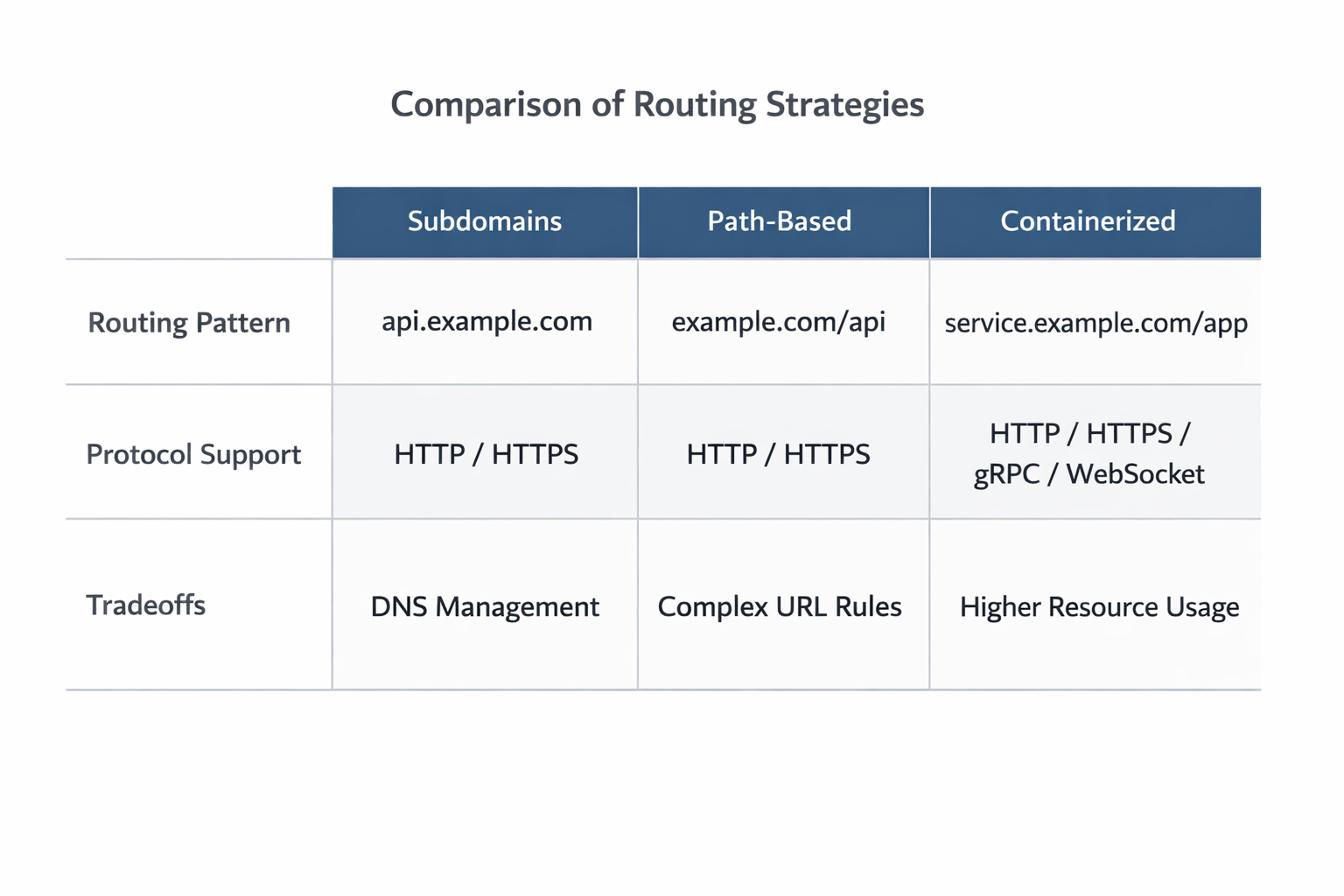
Subdomain routing is often cleaner for separating concerns. api.example.com, app.example.com, and admin.example.com each map to different backends, policies, and teams. This reduces ambiguity, simplifies cookie scoping, and makes TLS and security boundaries easier to reason about. It is usually the best choice when the apps are logically distinct.
Path-based routing can be convenient when you want a single public domain. It is common for /api, /auth, /docs, and / to route to different internal services. The tradeoff is that application code, cookies, redirects, and relative URLs must all be aware of the path prefix. Path-based routing is powerful, but it tends to be more fragile than subdomain routing unless carefully designed.
Canary releases allow you to send a small percentage of traffic to a new version before full rollout. Blue/green deployments go further by keeping two complete environments and switching traffic between them once the new version is validated. Nginx can support these patterns with weighted upstreams, header-based routing, or external orchestration that updates backend targets.
A/B traffic splitting is similar, but the goal is experimentation rather than deployment safety. For example, a portion of users might see a new checkout flow while others stay on the current version. In these cases, the reverse proxy often needs deterministic routing based on cookie values, headers, or request metadata so users remain pinned to a given variant.
The architecture decision here is less about whether Nginx can route traffic and more about how you want traffic behavior to match product, release, and reliability goals. Good routing policy becomes a control surface for the organization, not just the application.
10. Troubleshooting and Monitoring
Even a well-written Nginx config can fail in production if you do not test it and monitor it properly. Troubleshooting starts with syntax validation and predictable reload behavior.
Always test the configuration before reloading. A syntax error or invalid directive can prevent startup or break a hot reload. A disciplined workflow is to validate config, review the active files, then reload gracefully so existing connections are not unnecessarily dropped.
Common errors include incorrect proxy_pass path handling, missing headers, wrong upstream ports, certificate mismatches, and DNS resolution problems. Another frequent issue is confusing application errors with proxy errors. If the app returns a 500, Nginx may merely be forwarding the result. If Nginx itself returns a 502 or 504, the issue is often upstream connectivity or timeout behavior.
Logging is essential. Access logs help you understand route distribution, status codes, latency, and client behavior. Error logs show upstream failures, protocol mismatches, and misconfigurations. For production observability, add request IDs and ensure your application logs correlate with proxy logs. That makes tracing a single request across the stack much easier.
Monitoring should include proxy health, backend health, error rates, response times, and saturation indicators. If you are operating at scale, metrics for connection states, upstream retries, cache hit ratios, and TLS handshake behavior can provide early warning before user impact becomes visible.
A production checklist for Nginx should include: validated config, known upstreams, TLS certificates installed and renewing, secure headers configured, rate limiting in place where needed, log retention defined, rollback strategy documented, and reload procedures tested. The more traffic Nginx handles, the more important it becomes to treat it as a managed platform component rather than just a config file.
Conclusion
Nginx remains a strong reverse proxy choice because it solves the practical problems modern application teams face every day: routing traffic cleanly, terminating TLS consistently, balancing load, preserving client context, and protecting backends from unnecessary complexity. Its value is not limited to legacy web hosting or simple HTTP forwarding. It fits into container platforms, multi-service architectures, realtime systems, and API-driven products with equal effectiveness.
The most successful deployments treat Nginx as a traffic control layer with clear responsibilities. Define your upstreams deliberately. Preserve the right request metadata. Harden TLS and headers. Tune buffering and timeouts for your application’s behavior. Then monitor the proxy as carefully as the services behind it. When set up well, Nginx improves reliability, simplifies operations, and gives you a stable foundation for serving modern applications at scale.