
Beyond Busywork: How Smarter Technology Unlocks Real Team Productivity
Teams rarely fail because people are lazy or unmotivated. More often, productivity breaks down because work is harder to move than it should be. A request gets lost in chat. A task waits for approval. A report gets rebuilt in three different tools. An update is copied from one system to another because nothing connects cleanly. The result is not just wasted time, but mental load, context switching, and a steady erosion of momentum.
That distinction matters. If you treat productivity as a people problem, you usually respond with pressure: work harder, move faster, do more. If you treat it as a workflow problem, you start asking better questions: Where does work stall? Which steps add value, and which steps only add friction? What should be automated, standardized, or eliminated entirely?
Modern technology has made this problem more visible, not less. Many teams now have more software than ever, yet still struggle to finish work efficiently. The issue is not a lack of tools. It is that tools are often layered on top of broken processes. In that environment, each new system promises speed but frequently adds another login, another handoff, another notification stream, and another place where work can disappear.
The opportunity is different now. AI, automation, and agentic systems can eliminate repetitive effort, reduce delays between steps, and help teams spend more time on judgment-heavy work. But those gains only happen when technology is applied with a clear understanding of the workflow itself. Without that, even advanced tools can create more complexity than value.
This post breaks down how to think about productivity through a workflow lens, where technology creates leverage, where it backfires, and how to redesign work so your tech stack becomes a force multiplier instead of a friction multiplier.
1. The productivity problem isn’t always people — it’s friction in the workflow
When teams miss deadlines or feel perpetually overloaded, the instinct is often to assume the people are the bottleneck. But in many organizations, the real problem is structural friction. Work gets slowed by the systems around the people: unclear ownership, redundant approvals, disconnected tools, ambiguous inputs, and manual re-entry of information. A highly capable team can still look unproductive if the workflow forces them to spend too much time navigating the process instead of executing the work.
Friction shows up in predictable ways. A designer waits for a brief that never arrives in a usable format. An engineer pauses because requirements were captured in a meeting but not documented. A finance team spends hours reconciling data across spreadsheets because the source systems do not align. A support team cannot resolve an issue quickly because customer history lives in three different databases. In each case, the work itself is not especially complex, but the path it takes is unnecessarily hard.
This is why “productivity” should not be measured only in terms of effort or busyness. A team can be busy all day and still produce little value if most of its time is spent on coordination overhead. Friction consumes capacity silently. It creates the illusion of activity while reducing actual throughput. It also increases the probability of mistakes, because every extra touchpoint creates another chance for something to be lost, misunderstood, or delayed.
The first step in improving productivity is to separate value-adding work from friction-adding work. Value-adding work changes the product, serves the customer, or advances a business decision. Friction-adding work exists because the process is poorly designed, not because it is inherently necessary. Once you start seeing workflow friction as the real problem, the solution space changes. You stop asking, “How do we make people work harder?” and start asking, “How do we remove the obstacles that make work harder than it needs to be?”

2. Why “more tools” often creates slower teams, not faster ones
Tool sprawl is one of the most common ways organizations accidentally reduce productivity while trying to improve it. A team adopts a project tracker to improve visibility, a messaging platform to speed communication, a documentation system to centralize knowledge, a form tool to standardize intake, and an automation platform to reduce manual work. Individually, each tool may solve a real problem. Collectively, they can create a fragmented operating environment where work is constantly moving between systems instead of moving forward.
Every additional tool introduces overhead. People must learn it, remember when to use it, maintain their data in it, and reconcile it with other systems. Even if the tool saves time in one area, it can create new work elsewhere. For example, a faster intake process may be offset by more time spent manually updating the project tracker. A better chat app may increase response speed but also raise interruption volume. A reporting platform may improve visibility but require data exports from multiple sources before it becomes useful. In practice, teams do not experience the idealized benefits of each tool in isolation; they experience the cumulative cost of the entire stack.
The deeper issue is that many tools are adopted based on feature comparison rather than workflow fit. A tool with powerful capabilities is not necessarily a productive tool. Productivity depends on whether it reduces end-to-end effort across the full process. If a tool speeds up one micro-step but slows down three others, the team gets worse, not better.
There is also a cognitive cost. Tool proliferation forces people to remember where information lives and how each system behaves. That memory burden is invisible in budget spreadsheets, but it shows up in real life as hesitation, duplicate work, and context switching. Teams waste energy deciding where to put something instead of using the thing itself. Managers lose visibility because status is scattered across systems. Leaders get reports that are technically correct but operationally late.
The lesson is simple: more tools only help when they are intentionally integrated into a workflow that has been designed to benefit from them. Without that discipline, software does not create velocity; it creates drag.
3. The new productivity frontier: AI, automation, and agentic systems
The current wave of productivity technology is different from earlier generations of software because it does more than store, transmit, or display information. AI and automation can now interpret inputs, generate outputs, route work, and in some cases act across systems with limited human intervention. That changes the productivity equation. Instead of merely digitizing old steps, teams can increasingly remove steps altogether or compress multiple steps into one.
Automation has long been useful for rule-based tasks: moving data between systems, sending alerts, generating routine reports, or triggering actions when conditions are met. AI expands that reach by handling less structured work. It can classify requests, summarize documents, draft messages, extract meaning from text, identify patterns, and support decisions where rules alone are not sufficient. Agentic systems go a step further by chaining actions together. They do not just respond to a prompt; they can follow a workflow, call tools, gather context, and complete multi-step tasks with oversight.
This matters because many of the most expensive productivity losses in organizations come from tasks that are repetitive but not fully trivial. They require enough judgment that humans traditionally had to do them manually, yet they are routine enough to become bottlenecks at scale. AI is particularly strong in that middle ground. It can reduce the amount of human attention required for work that does not merit full manual handling.
That said, the frontier is not “replace everyone with bots.” The real opportunity is to reassign human effort toward tasks that require context, strategy, empathy, and tradeoff decisions. The best systems do not aim to automate every action; they aim to automate the least valuable parts of the workflow so people can focus on the parts where judgment actually matters.
This is why the most effective AI deployments usually start with a specific operational pain point rather than a vague desire to “use AI.” If a team is drowning in request triage, AI can help classify and route items. If knowledge is buried in documents, AI can help retrieve and summarize relevant information. If status reporting consumes hours each week, AI can draft updates from source systems. In each case, the goal is not novelty. The goal is to reduce friction, shorten turnaround time, and recover human capacity for higher-value work.

4. Where technology helps most: repetitive tasks, handoffs, and decision support
Technology creates the most value when it targets work that is repetitive, delayed, or structurally ambiguous. These are the places where teams lose the most time and where improvements compound across the organization.
Repetitive tasks
Repetitive tasks are ideal candidates for automation because they consume time without consuming much novelty. Examples include data entry, report generation, invoice matching, ticket categorization, meeting note summaries, reminder messages, and standard follow-ups. When these activities are handled manually, they absorb attention that could be used elsewhere. When they are automated, teams reclaim hours while reducing error rates. The benefit is not just speed; it is consistency. People get tired, distracted, and inconsistent. Well-designed automation does not.
Handoffs
Handoffs are another major source of waste. Every time work moves from one person or team to another, information can be lost, delayed, or reformatted. Handoffs often require clarification, rework, or waiting. Technology helps by standardizing intake, routing requests automatically, enriching work items with context, and ensuring the next owner receives everything they need. Good systems reduce the number of times humans have to interpret the same request. They create continuity where organizations often create gaps.
Decision support
Not all productivity gains come from replacing work. Some come from improving decisions. AI and analytics can help teams prioritize tasks, identify risks, surface anomalies, compare options, and summarize relevant context faster than humans can do manually. This does not mean the system should decide for the team. It means the system should reduce the cost of making a good decision. Better visibility leads to faster alignment, fewer misunderstandings, and less time spent debating basic facts.
The common thread across these use cases is leverage. Technology helps most when it removes low-value effort from the system and amplifies the team’s ability to act with clarity. The best outcome is not simply that a task gets done faster. It is that the entire workflow becomes easier to understand, easier to execute, and easier to improve.
5. Where technology backfires: fragmented systems, low adoption, and poor governance
Technology backfires when it is deployed as an overlay rather than as part of a coherent operating model. The most common failure modes are fragmentation, weak adoption, and poor governance. Any one of these can erase the productivity gains a tool is supposed to create.
Fragmentation happens when systems are added without a plan for how they will connect. A team may track one part of the workflow in a ticketing system, another part in spreadsheets, another in chat, and another in email. The result is not digital transformation; it is digital scattering. Workers must reconstruct the state of the work from multiple sources, which slows execution and increases the chance of mistakes. Fragmented systems also make leadership blind, because no single source shows the full picture.
Low adoption is equally damaging. Even a well-chosen tool fails if it does not fit how people actually work. If the tool is too complex, too rigid, or too disconnected from daily tasks, people will bypass it. They will create shadow processes in documents, chats, and side channels. That means the official system becomes a reporting burden instead of an operating tool. The organization then loses both productivity and trust.
Poor governance is the third failure mode, and it is especially relevant for AI. Without clear rules for data quality, permissions, approval flows, and accountability, technology can introduce risk while promising speed. An automation that pushes bad data downstream can create more rework than the manual process it replaced. An AI assistant that summarizes inaccurate context can mislead decision-making. An ungoverned workflow can make it hard to know who owns an output or how errors are corrected.
These failure modes are often invisible during pilot phases because small demos tend to mask operational complexity. A tool can look impressive in a controlled environment and still fail at scale because the real workflow is messier, more distributed, and more dependent on exceptions. That is why productivity technology must be evaluated not only on capability, but on fit, adoption, and control.
The practical takeaway is that software should reduce ambiguity, not multiply it. If a tool adds another place where work can break, it may be making the organization slower even if it looks modern.
6. The hidden cost of surface-level AI: why productivity gains don’t always transform work
A common mistake in AI adoption is confusing output generation with workflow improvement. A tool that writes text, summarizes documents, or drafts responses can save time in a narrow sense, but that does not automatically transform how work gets done. Surface-level AI often improves the first mile of a task while leaving the rest of the process unchanged.
This matters because many workflows are not bottlenecked by content creation alone. They are bottlenecked by review loops, data quality, approval structures, unclear ownership, and inconsistent standards. If AI speeds up draft creation but the draft still goes through four rounds of manual review, the net productivity gain may be modest. If AI summarizes a meeting but decisions still have to be manually extracted and entered into a separate system, the workflow remains fragmented. If AI drafts a support response but the underlying knowledge base is outdated, the speed increase may actually reduce quality.
Surface-level AI can also create a false sense of progress. Teams may believe they have “automated” a process when they have only automated one visible artifact. The real process still depends on human coordination, manual cleanup, and repeated validation. In that case, the AI produces a local improvement but not an organizational one.
There is another hidden cost: normalization of low-trust output. When teams use AI primarily to generate first drafts, they may shift effort from creation to verification. That can still be a net win, but only if the verification step is efficient and well-defined. Otherwise, the team simply moves the burden downstream. The organization then appears more productive because it produces more content, but actual throughput, quality, and decision speed do not improve meaningfully.
The most durable AI gains come when the technology is embedded in a redesigned process. That means clarifying what should be automated, what should be reviewed, what should be standardized, and what should be escalated. Without that redesign, AI becomes a convenience layer rather than a productivity engine.
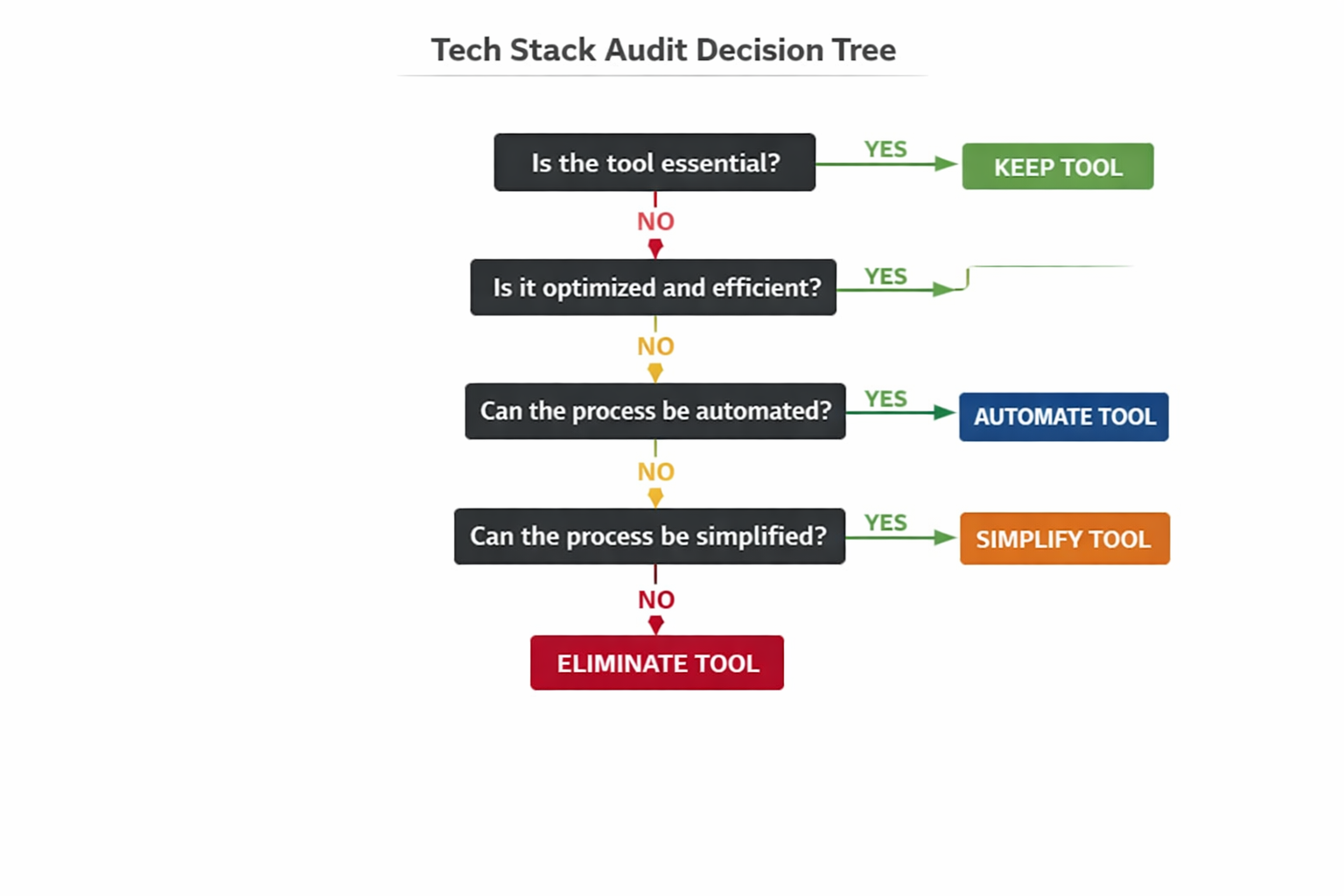
7. A practical framework for auditing your tech stack through a workflow lens
If your team wants real productivity gains, start by auditing the workflow rather than the software inventory. The key question is not “What tools do we have?” It is “How does work actually move from request to completion, and where does it stall?”
A useful way to evaluate this is to map a representative workflow end to end. Choose a process that matters: customer onboarding, campaign delivery, incident response, purchase approval, hiring, content production, or feature release. Then trace each step from trigger to outcome.
Step 1: Define the workflow boundary
Identify where the work starts and where it ends. Be precise. For example, a customer support workflow may begin when a ticket is submitted and end when the issue is resolved and documented. A hiring workflow may begin when a role is approved and end when the candidate accepts the offer. Clear boundaries help prevent analysis from becoming too abstract.
Step 2: List every step and owner
Document each handoff, approval, review, and system touchpoint. Who receives the work? Who transforms it? Who approves it? What tool is used at each stage? This often reveals hidden complexity that leadership does not see in dashboards.
Step 3: Classify each step
For each step, ask whether it is:
value-adding,
necessary but non-value-adding,
redundant,
delay-prone,
or automation-ready.
This classification is important because not all friction should be removed in the same way. Some steps are essential controls; others are legacy habits.
Step 4: Measure pain, not just duration
A step that takes two minutes but happens 200 times a day can be more costly than a step that takes an hour once a week. Look for frequent interruptions, repeated clarifications, duplicated data entry, and manual reconciliation. High-frequency friction usually produces the biggest payoff.
Step 5: Identify system conflicts
Note where tools overlap or contradict each other. If the same information is maintained in multiple places, ask which system should own the truth and how other systems should sync. Redundancy is one of the biggest hidden costs in a stack.
Step 6: Map opportunities to automate, simplify, or eliminate
Not every problem needs AI. Some should be solved with better forms, clearer standards, fewer approvals, or simpler routing. Use technology where it reduces effort, not where it merely appears sophisticated.
A workflow audit turns productivity from a vague aspiration into an operational diagnosis. Once you can see the process clearly, you can improve it deliberately.
8. How to redesign processes before you buy another tool
The strongest productivity gains often come from process redesign, not software acquisition. If a workflow is slow, adding a tool to a bad process usually just makes the bad process digital. Before buying another platform, redesign the work itself.
Start by asking whether the process still reflects its original purpose. Many workflows accrete controls, approvals, and checkpoints over time because of one-off incidents, organizational changes, or risk concerns. Those additions may have been rational at the time, but they often remain long after their value has faded. The process becomes heavier than the problem it was designed to solve.
A good redesign effort begins with simplification. Remove unnecessary approvals. Consolidate duplicate input fields. Standardize common request types. Replace ad hoc coordination with explicit routing rules. Eliminate steps that exist only because another team lacks visibility. The more the process depends on memory and personal habit, the more fragile it becomes.
Next, design for exception handling, not just the happy path. Many workflows appear efficient in ideal conditions but break down when something unusual happens. A strong process defines what happens when information is missing, a request is urgent, a dependency slips, or a decision requires escalation. Good technology should support this structure, not obscure it.
Then, focus on interfaces between teams. Cross-functional work is where most delays accumulate. When marketing, sales, product, operations, legal, finance, or engineering must coordinate, the boundaries matter more than the internal steps. Redesign these interfaces by clarifying ownership, required inputs, service levels, and response expectations. Often, one well-defined handoff can save more time than five individual automations.
Only after this redesign should you evaluate tools. At that point, software can be chosen to support a cleaner, more stable workflow. That sequence matters. Technology should reinforce a good process, not compensate for a bad one.
When organizations reverse that order, they end up paying for sophistication they cannot fully absorb. When they redesign first, technology becomes much more powerful because it is operating inside a system that is already aligned to productivity.
9. Measuring real productivity: throughput, cycle time, quality, and employee capacity
If you want to know whether technology is actually helping, you need better metrics than activity counts or feature adoption. Real productivity is visible in how work flows, how quickly it completes, and how much capacity remains for high-value effort.
Throughput
Throughput measures how much work is completed over a given period. This could be tickets resolved, requests fulfilled, features shipped, invoices processed, or onboarding cases completed. Throughput helps reveal whether the team is producing more output, but it should be interpreted carefully. More throughput is useful only if quality holds steady and the work is meaningful.
Cycle time
Cycle time measures how long it takes for work to move from start to finish. This is often the most revealing productivity metric because it captures delay, waiting, and handoff inefficiency. A team can have high throughput but long cycle time if it is working on many items at once. Reducing cycle time usually improves responsiveness, predictability, and morale.
Quality
Speed without quality is not productivity; it is rework. Measure defect rates, escalation rates, customer satisfaction, error frequency, or revision counts depending on the workflow. If a tool speeds up production but increases downstream correction, the net result may be negative. Quality metrics keep optimization honest.
Employee capacity
Capacity is the amount of meaningful work a person or team can take on without burnout or degradation. Technology should expand capacity by removing low-value tasks, not by increasing expectations indefinitely. If every productivity gain gets immediately converted into more assigned work, employees may feel no relief at all. In that case, the organization has improved efficiency on paper but not in lived experience.
A mature measurement model tracks all four dimensions together. High throughput with poor quality is a warning sign. Fast cycle time with low capacity is not sustainable. Great quality with slow cycle time may indicate hidden friction. The goal is balanced improvement, not metric gaming.
10. Conclusion: productivity grows when technology reduces effort, not just adds features
The most productive teams are not the ones with the most tools or the most aggressive adoption of the latest technology. They are the teams whose workflows make it easy to move work forward. In those organizations, technology is not an extra layer of complexity. It is a mechanism for removing friction, reducing handoffs, accelerating decisions, and preserving human attention for the work that truly requires judgment.
That is the central lesson of modern productivity strategy: efficiency is not about adding more software features. It is about reducing the effort required to get important work done. AI, automation, and agentic systems can absolutely help, but only when they are applied to the right problems and embedded in well-designed processes. Otherwise, they risk becoming just another source of noise.
If you want real productivity gains, start by studying how work actually moves. Identify where time is lost, where context disappears, where people are forced to repeat themselves, and where systems create unnecessary effort. Then redesign the process first, and choose technology that reinforces the improved flow.
When technology is aligned with workflow, teams do not just work faster. They work with less friction, less rework, and more confidence. That is the kind of productivity that lasts.